
Solar System Simulator
Pick a date or press Play and watch the planets move around the Sun where they really are.
Free · runs in your browser · nothing is uploaded
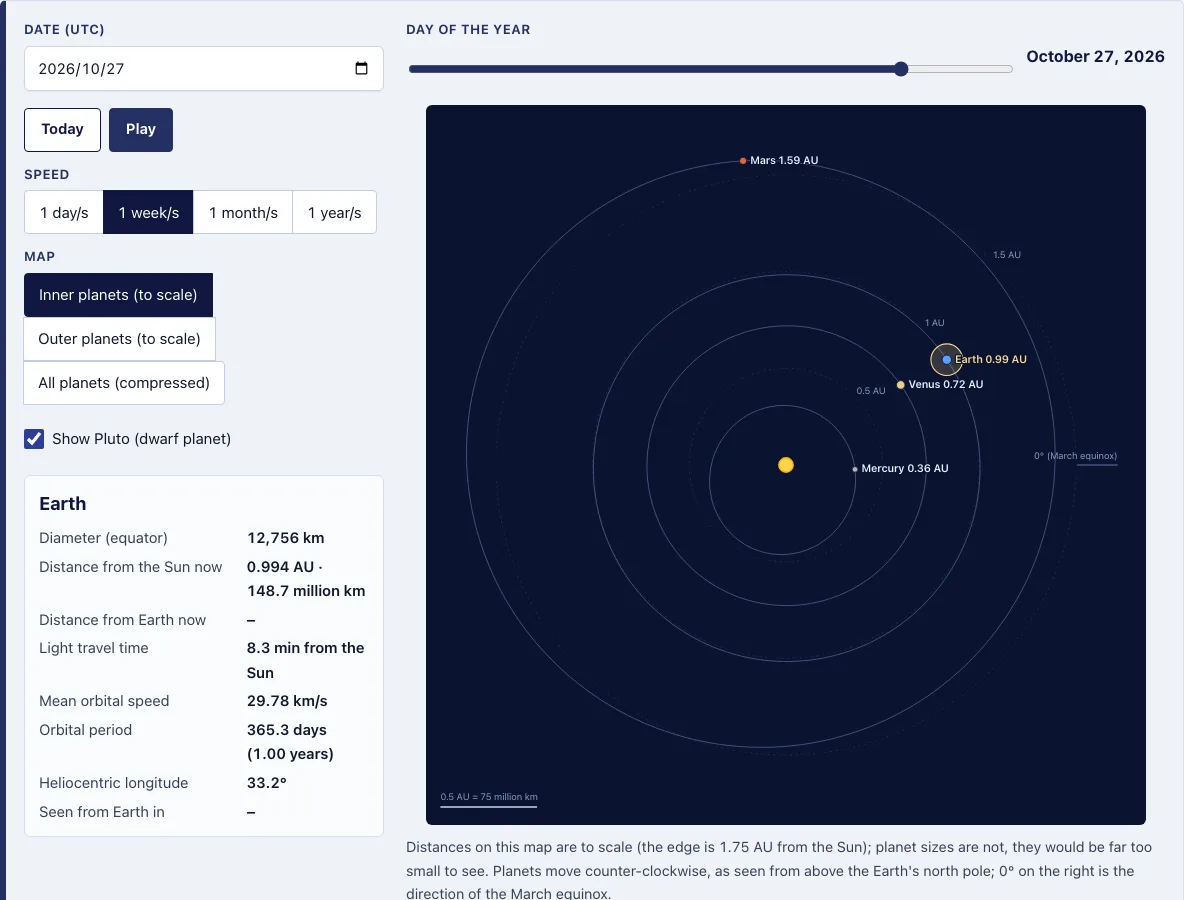
How to use the Solar System Simulator
- Set a date in the Date (UTC) field. Any date from 1600 to 2400 works. Press Today to return to the current date.
- Press Play to start the planets moving and Pause to stop them. The date field keeps counting while they move, so you can stop on any day and read the positions.
- Choose a Speed: 1 day/s, 1 week/s, 1 month/s or 1 year/s. This sets how much simulated time passes each real second.
- Pick a Map: Inner planets (to scale), Outer planets (to scale) or All planets (compressed). Start with the inner map to watch Mercury lap Earth, then switch to the compressed map to see Jupiter and Saturn creep along.
- Tick Show Pluto (dwarf planet) if you want Pluto included.
- Drag the Day of the year slider to move through the chosen year.
- Click or tap a planet, or press Tab to reach it and then Enter, to open its panel.
- Read the table below the map for each planet’s distance from the Sun and from Earth, its orbital period and the constellation it is seen in.
Press Copy link to save the date, map, speed, Pluto setting and selected planet in one link you can share. If reduced motion is turned on in your operating system, Play jumps once per second instead of animating smoothly.
Why do planets move at different speeds?
Planets closer to the Sun move faster and finish their orbits sooner. Kepler’s third law ties period to distance: the square of the orbital period in years equals the cube of the average distance in AU (P² = a³). Mercury averages 47.36 km/s, while Neptune averages 5.45 km/s.
The law is why the outer planets take so long. Jupiter’s semi-major axis is 5.203 AU, so a³ is 140.9 and its square root is 11.87 years, close to the NASA figure of 11.86 years. Each planet’s panel lists its period in days and years, so you can check the pattern yourself.
| Planet | Orbital period |
|---|---|
| Mercury | 87.969 days |
| Earth | 365.256 days |
| Jupiter | 11.86 years |
| Neptune | 164.79 years |
| Pluto | 247.94 years |
Planet orbits are ellipses with the Sun at one focus, so a planet’s distance and speed change slightly along its path. Mars ranges from 1.38 to 1.67 AU from the Sun, while Earth ranges only from 0.983 to 1.017 AU.
Is the solar system simulator to scale?
Partly. The two “to scale” maps draw distance from the Sun accurately, while the compressed map keeps directions true but not distances. Planet sizes are never to scale on any map.
| Map | Distance from the Sun | Outer edge |
|---|---|---|
| Inner planets | To scale | 1.75 AU (Mercury to Mars) |
| Outer planets | To scale | 50 AU with Pluto, 31.5 AU without |
| All planets (compressed) | Square root of distance, not to scale | 50 AU with Pluto, 31.5 AU without |
Planets are drawn as dots, and the difference is large. On the inner map, a true-size Earth would be about 0.02 of a pixel across. Use the to-scale maps when you want to compare distances, and use the compressed map when you want to see all the planets at once.
How far is each planet from the Sun today?
Each distance changes through the year because the orbits are ellipses, so the simulator reads it for the exact date. The table shows the values it gives for 25 October 2026 next to NASA’s mean distance (semi-major axis); set a date to read the same figures from the planet labels and the table under the map.
| Planet | 25 Oct 2026 (AU) | NASA mean (AU) |
|---|---|---|
| Mercury | 0.371 | 0.387 |
| Venus | 0.724 | 0.723 |
| Earth | 0.995 | 1.000 |
| Mars | 1.587 | 1.524 |
| Jupiter | 5.315 | 5.203 |
| Saturn | 9.427 | 9.537 |
| Uranus | 19.437 | 19.191 |
| Neptune | 29.878 | 30.069 |
How this tool works and where the numbers come from
Heliocentric positions from astronomy-engine (VSOP87 for the planets, a numerical model for Pluto), rotated to the J2000 ecliptic. Tests compare heliocentric longitudes and distances with NASA JPL Horizons (DE441) for 2000-01-01 and 2026-10-25 (agreement better than 0.01 degrees) and check Kepler’s third law with the NASA semi-major axes. Planet facts are from the NASA Planetary Fact Sheets.
Sources
Frequently asked questions
Where are the planets right now?
Press Today to set the date to the current day in UTC. The planets are drawn at their positions for that date, and each label shows its distance from the Sun in AU. The table below the map lists the distance from Earth for each planet too.
How long does light take to reach Earth from the planets?
Light travel time equals distance divided by 299,792.458 km/s. On 25 October 2026, Earth was 0.995 AU from the Sun, so sunlight took 8.3 minutes to arrive. Mars was 1.489 AU (222.7 million km) from Earth, so its light took 12.4 minutes.
Why isn’t the Moon shown?
The Moon stays only 0.0026 AU (384,400 km) from Earth, so its whole orbit would sit inside Earth’s dot on the map. Leaving it out keeps the view readable.
Why is Pluto a checkbox?
Pluto is a dwarf planet, so the simulator lets you choose whether to include it. Tick Show Pluto (dwarf planet) to add it. Including Pluto changes the outer map edge from 31.5 AU to 50 AU.
Is the solar system simulator accurate?
The positions match NASA’s own ephemeris closely. In tests, heliocentric longitudes agreed with NASA JPL Horizons (DE441) to better than 0.01 degrees for 1 January 2000 and 25 October 2026. Orbital periods, diameters and mean speeds come from NASA Planetary Fact Sheets.
How is this different from PhET My Solar System?
PhET’s My Solar System is a gravity sandbox where you build made-up bodies. This page shows the real planets for a date you choose, with NASA figures, distances from Earth and the constellation each planet is in.
Related tools
- Solar System Scale Calculator: use it to work out how large real distances look on a scale model.
- Planets Visible Tonight: use it when you want to know which planets you can see in the sky.
- Star Map Generator: use it to make a chart of the stars for a place and time.
- Julian Date Calculator: use it to convert a calendar date into a Julian date.
- Angular Size Calculator: use it to find how large an object appears in the sky.
- Telescope Magnification Calculator: use it to work out the magnification a telescope gives.
- Next Solar Eclipse: use it to find when the next solar eclipse happens.
- Stargazing Calendar: use it to plan sky events across the year.
Want to see the planets for yourself? The Night Gaze Camp app ranks campgrounds by tonight’s moonlight, clouds and sky darkness.